
Knott's Scary Farm 2026 Lineup: New Mazes, Shows, Big Rule Change
Aug 20, 2026
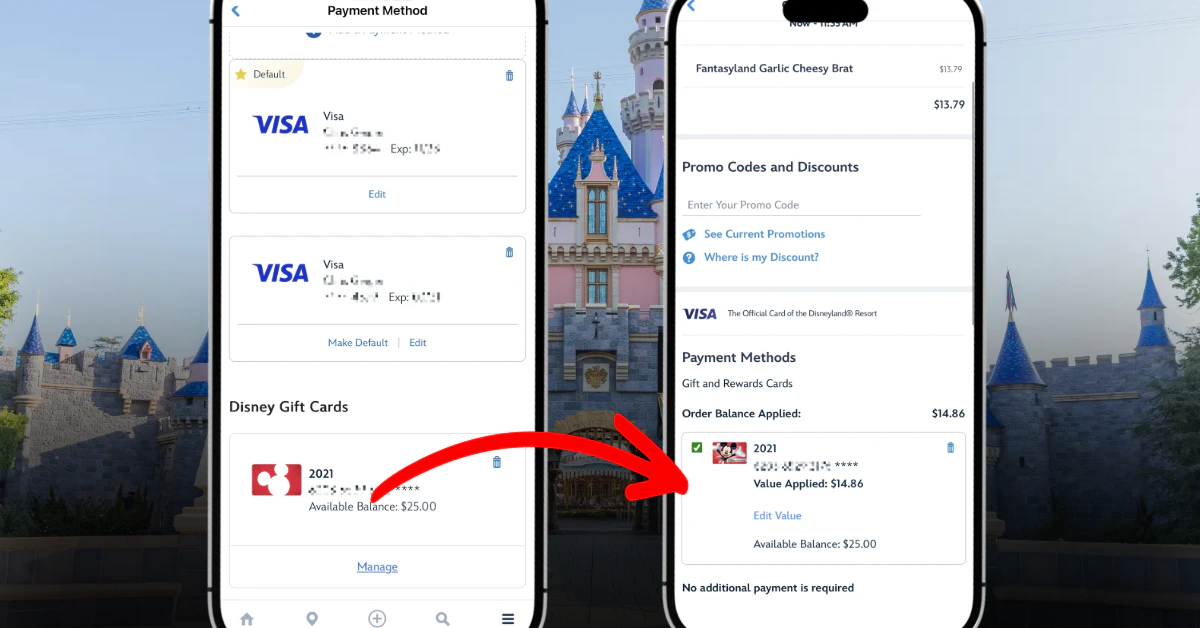
Disney has added the ability to save a Disney Gift Card in the MyDisney Wallet across the Disneyland and Walt Disney World apps. Gift cards have always been accepted as payment — the change is that you can now store one and reuse it at checkout, instead of re-entering the card number and PIN on every purchase.
For guests who buy discounted Disney Gift Cards from warehouse clubs and use them as their main spending money in the parks, this removes a step that has been a long-standing annoyance.
Open the menu in the Disneyland or Walt Disney World app, go to Account, and select MyDisney Wallet. Choose to add a payment method, then scroll past the credit and debit card options to the gift card section and enter the card number. You can store up to six gift cards at a time, in addition to any saved credit or debit cards.
If you have registered gift cards at DisneyGiftCard.com under the same login, they may already appear in your wallet automatically.
A Disney Gift Card cannot be set as your default payment method, so there is one extra tap at checkout. For mobile food orders, complete your order as usual, then select the option to use a different form of payment and pick your saved gift card.
Saved gift cards currently work for most purchases, including mobile food and beverage orders, theme park tickets, and merchandise. Each card also stores a barcode under its "Manage" screen that can be scanned for in-person purchases, along with a transaction history.
Two limits are worth keeping in mind. Tickets can only be paid with a single gift card — if the balance doesn't cover the full price, the app won't let you split it across a second card, so load enough onto one card before buying. Lightning Lane purchases are not supported yet, though Disney may add more options over time.
Discover more articles in this category and related topics.
View All Disneyland Posts
Aug 20, 2026

Aug 20, 2026
Aug 20, 2026

Aug 20, 2026

Aug 19, 2026
Get exclusive access to real-time park information, insider tips, and personalized recommendations for your next magical adventure.
Free forever • No credit card required
 Theme Park IQ
© 2023-2026 Theme Park IQ. All rights reserved.
Theme Park IQ and IQ Brands, LLC are in no way associated with the Walt Disney Company, NBCUniversal, or any other theme park owners, operators, or their subsidiaries or affiliates.
Theme Park IQ's sole purpose is to help park goers with their trip planning and in-park experience.
We use cookies to analyze site traffic and show relevant ads. Cookie Policy
Choose which cookies you'd like to allow. Your preferences are saved for 12 months.
Required for the website to function. Includes session management, security tokens, and your cookie preferences.
Help us understand how visitors use our site so we can improve your experience. Uses Google Tag Manager.
Used to show you relevant ads via Google AdSense. Without these, you'll still see ads, but they won't be personalized.
Your browser's Global Privacy Control (GPC) signal has been detected. Advertising cookies are off by default to honor your preference.